

1. What Is an SEO Audit — and Why It Still Matters in 2026
An SEO audit is a systematic examination of every factor that influences how well your website ranks on Google and other search engines. Think of it as a full health check for your website — one that uncovers hidden technical problems, weak content, and missed opportunities that are quietly costing you traffic and leads.
In 2026, running a regular SEO audit is more critical than ever. Google has rolled out multiple major updates in the past 25 months — including the March 2024 Core Update, the Helpful Content consolidation, and the gradual rollout of AI Overviews (SGE). Sites that skip regular audits are almost always running with outdated signals, broken pages, and content that no longer matches what Google wants to rank.
Also Read:- Why Regular SEO Audits Are Essential For Website Health
| 💡 Real-World Impact In our experience auditing 100+ websites at G2S Technology, the average site has 3–5 critical technical issues, 40–60% of pages with missing or duplicate meta tags, and at least one major content gap that a competitor is already exploiting. An audit finds all of this before it gets worse. |
2. The 3 Pillars of a Complete SEO Audit
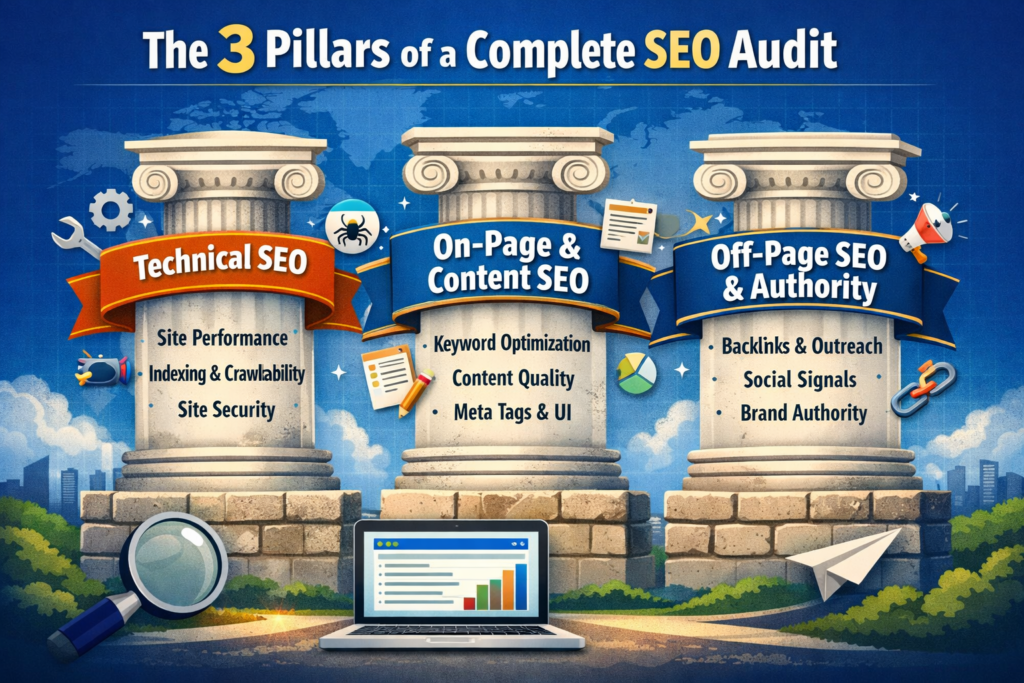
A thorough SEO audit covers three interconnected layers. Missing any one of them gives you an incomplete picture.
Pillar 1 — Technical SEO
This is the foundation. If search engines cannot crawl and index your website correctly, nothing else matters. Technical SEO covers site speed, mobile usability, HTTPS, crawl errors, Core Web Vitals, structured data, and more.
Pillar 2 — On-Page & Content SEO
This covers everything on your pages — content quality, keyword targeting, meta tags, heading structure, internal linking, and image optimisation. Google’s Helpful Content System now evaluates whether your content demonstrates real first-hand expertise (E-E-A-T), not just keyword density.
Pillar 3 — Off-Page SEO & Authority
This looks at external factors — your backlink profile, brand mentions, digital PR, and how authoritative your domain appears to search engines. A strong off-page profile can help you outrank technically better sites; a toxic one can drag you down even if everything else is perfect.
3. Tools You Need Before You Start
You don’t need every tool on this list — but you do need the free ones. Here is our recommended toolkit:
| Tool | Cost | Best For | Rating |
|---|---|---|---|
| Google Search Console | Free | Index issues, CTR, Core Web Vitals, manual actions | ⭐⭐⭐⭐⭐ |
| Google Analytics 4 | Free | Traffic, user behaviour, conversion tracking | ⭐⭐⭐⭐⭐ |
| Screaming Frog | Free / £259/yr | Full site crawl, broken links, duplicate content, meta tags | ⭐⭐⭐⭐⭐ |
| Ahrefs | From $99/mo | Backlink analysis, keyword research, content gap | ⭐⭐⭐⭐⭐ |
| SEMrush | From $139/mo | Technical audit, rank tracking, competitor analysis | ⭐⭐⭐⭐ |
| PageSpeed Insights | Free | Core Web Vitals — LCP, INP, CLS per page | ⭐⭐⭐⭐⭐ |
Start with Google Search Console and PageSpeed Insights (both free). Add Screaming Frog for a full crawl. Use Ahrefs or SEMrush for backlink and keyword analysis if budget allows.
4. Step-by-Step SEO Audit Process
4a. Technical SEO Audit
Step 1 — Run a Full Site Crawl
Use Screaming Frog (free up to 500 URLs) to crawl your entire website. This gives you an immediate list of:
- Pages returning 4xx or 5xx errors
- Missing or duplicate title tags and meta descriptions
- Pages blocked by robots.txt or no-index tags unintentionally
- Redirect chains and loops
- Images missing alt text
- Pages with thin content (under 300 words)
| ⚡ Quick Win Export your crawl to a spreadsheet and filter by ‘Status Code’. Fix all 404 errors first — either redirect them to the correct page or restore the content. This alone can recover lost link equity and improve user experience significantly. |
Step 2 — Check Core Web Vitals (INP Replaced FID in 2024)
Google’s Core Web Vitals are now a confirmed ranking factor. The three metrics you must optimise are:
- LCP (Largest Contentful Paint): Measures loading speed. Target: under 2.5 seconds.
- INP (Interaction to Next Paint): Replaced FID in March 2024. Measures responsiveness to user input. Target: under 200ms. Google defines INP scores in three bands: Good (under 200ms), Needs Improvement (200–500ms), and Poor (above 500ms).
- CLS (Cumulative Layout Shift): Measures visual stability. Target: under 0.1.
Check your scores in Google Search Console > Core Web Vitals report. Then use PageSpeed Insights for page-level diagnostics. Common fixes include compressing images, deferring unused JavaScript, and switching to faster hosting.
Step 3 — Verify Crawlability & Indexation
- In Google Search Console, go to Pages > Not Indexed. Review why pages are excluded — some exclusions are intentional, others are not.
- Check your robots.txt (yourdomain.com/robots.txt) for accidental blocks.
- Submit an updated XML sitemap at yourdomain.com/sitemap.xml and check for errors in GSC.
- Use the URL Inspection tool to verify that key pages are indexed and rendering correctly.
Step 4 — Audit HTTPS & Security
- Confirm that your site loads on HTTPS everywhere — including all subdomains.
- Check for mixed content warnings (HTTP resources loaded on HTTPS pages) using Chrome DevTools.
- Verify your SSL certificate is valid and not expiring within 60 days.
Step 5 — Test Mobile Usability
Over 65% of Google searches in India now happen on mobile. Use Google’s Mobile-Friendly Test and the Mobile Usability report in GSC. Look for: text too small to read, clickable elements too close together, content wider than screen.
4b. On-Page & Content Audit
Step 6 — Audit Title Tags & Meta Descriptions
- Every page needs a unique title tag under 60 characters with your primary keyword near the front.
- Every page needs a unique meta description under 155 characters that includes the keyword and a compelling reason to click.
- Use Screaming Frog to bulk-export all titles and metas, then identify duplicates, missing, or truncated ones.
Step 7 — Review Heading Structure (H1–H3)
- Every page should have exactly one H1 — the primary topic of the page.
- H2s should cover the major subtopics. H3s should nest inside H2s.
- Never skip heading levels (e.g., going from H1 directly to H4). This confuses both users and crawlers.
Step 8 — Evaluate Content Quality Against E-E-A-T
Google’s Quality Rater Guidelines are built around E-E-A-T: Experience, Expertise, Authoritativeness, and Trustworthiness. For each key page, ask:
- Does the content demonstrate first-hand experience or original research?
- Is there a named author with verifiable credentials and a detailed bio?
- Is the content more comprehensive and useful than the top 3 competing pages?
- Is the information current — updated within the last 12 months for time-sensitive topics?
| 🔍 Content Gap Analysis Search your target keyword on Google. Read the top 3 ranking pages. List every subtopic, question, or data point they cover that your page does not. Then add that missing information to your page. This is the single most reliable way to outrank existing results. |
Step 9 — Audit Internal Linking
- Check that every important page receives at least 3–5 internal links from other pages on your site.
- Use descriptive anchor text that includes keywords — not ‘click here’ or ‘read more’.
- Identify orphan pages (pages with zero internal links pointing to them) using Screaming Frog > No Inlinks filter.
- Prioritise linking from high-traffic blog posts to your service pages.
Step 10 — Keyword Cannibalisation Check
Keyword cannibalisation happens when two or more of your pages target the same keyword, causing them to compete against each other. Use Ahrefs’ Site Explorer or a simple Google search for ‘site:yourdomain.com [Local SEO Services in India]’ to find overlapping pages. Consolidate them where possible.
Step 11 — Image Optimisation
- Compress all images using WebP format where possible (typically 25–35% smaller than JPEG).
- Add descriptive alt text to every image — this helps both accessibility and image search.
- Use lazy loading for images below the fold to improve page speed.
4c. Off-Page SEO & Authority Audit
Step 12 — Analyse Your Backlink Profile
Use Ahrefs or SEMrush to export your full backlink profile. You are looking for three things:
- Quality of referring domains: Links from authoritative, relevant websites carry the most value. Check Domain Rating (DR) and topical relevance.
- Toxic or spammy links: Links from link farms, gambling sites, or paid link networks can trigger Google penalties. Use Google’s Disavow Tool cautiously for links you cannot get removed manually.
- Anchor text distribution: A natural link profile has a mix of branded, generic, and keyword anchor texts. An over-optimised profile (too many exact-match keywords) is a red flag.
Step 13 — Competitor Backlink Gap Analysis
In Ahrefs, use the Link Intersect tool: enter 3 of your top competitors. It shows you every website that links to them but not to you. These are your highest-priority link acquisition targets — they are already linking to similar content.
Step 14 — Brand Mentions & Digital PR
Set up Google Alerts for your brand name and key individuals in your business. When someone mentions you without linking, reach out and request a link — this is called unlinked brand mention reclamation and is one of the easiest link-building wins available. This is far more effective than the outdated approach of monitoring social shares.
Step 15 — Local SEO Audit (If Applicable)
If your business serves a local market — as G2S Technology does in Jaipur and across India — add a local SEO layer to your audit:
- Verify your Google Business Profile is fully optimised with accurate NAP (Name, Address, Phone), business hours, categories, photos, and regular posts.
- Check NAP consistency across all directories — Justdial, Sulekha, IndiaMART, and others.
- Review and respond to all Google reviews — frequency and quality of reviews is a local ranking factor.
Also Read:- How to Optimize Google My Business Profile for Maximum Local SEO Results
5. New in 2026: Auditing for AI Overviews & SGE
Studies estimate Google’s AI Overviews appear on a significant portion of informational searches as of early 2026, particularly for informational queries. This changes what a winning audit looks like.
What AI Overviews Mean for Your Audit
- Structured, scannable content wins: AI Overviews heavily favour content that directly answers questions in clear, concise language — the same format that wins Featured Snippets. Use short paragraphs, definition-first answers, and FAQ sections with schema markup.
- E-E-A-T is now even more critical: Google’s AI models are trained to surface content from demonstrably authoritative sources. Author bios, credentials, original research, and consistent brand presence matter more than ever.
- Brand entity optimisation: Ensure your business is mentioned alongside your key topics across multiple trusted sources. This helps Google’s Knowledge Graph associate your brand with authority on those topics.
- Zero-click preparedness: For some queries, AI Overviews will answer the question without a click. Focus your content strategy on queries where users need more depth than a snippet can provide.
6. How Often Should You Run an SEO Audit?
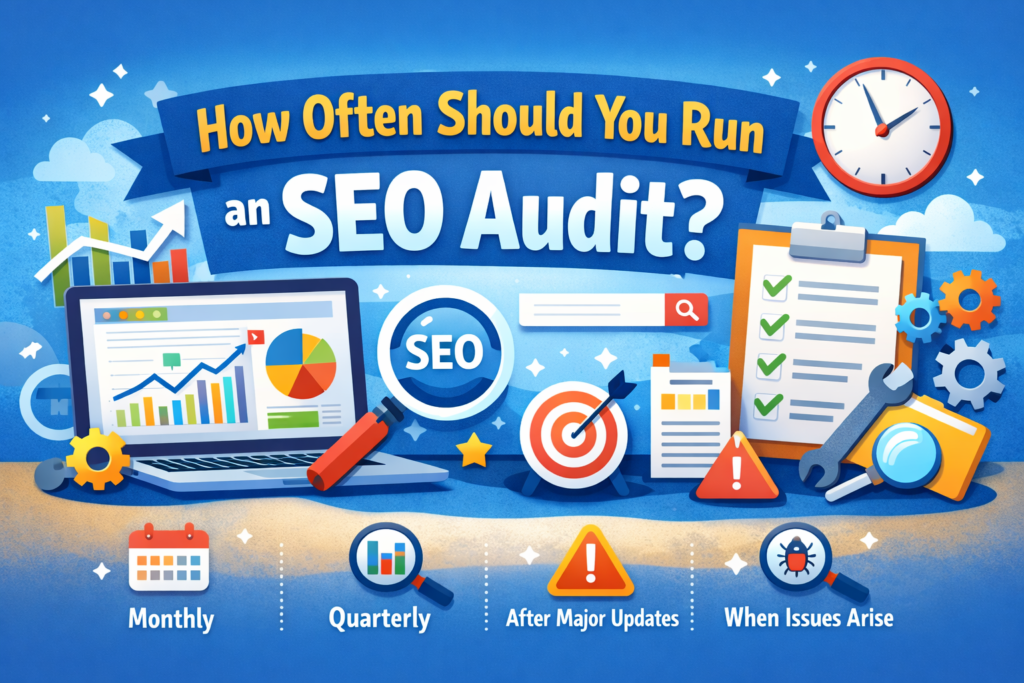
The right frequency depends on the size and activity level of your website:
| Audit Type | Frequency | What to Check |
|---|---|---|
| Quick Health Check | Monthly | GSC errors, Core Web Vitals, crawl alerts |
| On-Page Content Review | Quarterly | Top landing pages, meta tags, keyword rankings |
| Full Technical Audit | Every 6 months | Site crawl, indexation, backlinks, site speed |
| Comprehensive Full Audit | Annually | All 3 pillars + competitor analysis + strategy reset |
| After Any Major Google Update | Immediately | Traffic changes, ranking drops, manual actions |
Printable SEO Audit Checklist
Use this checklist for every audit. Tick each item as you go.
| Audit Item | Category | Priority | Done |
|---|---|---|---|
| GSC: Check for manual actions & coverage errors | Technical | 🔴 Critical | ☐ |
| Core Web Vitals: LCP < 2.5s, INP < 200ms, CLS < 0.1 | Technical | 🔴 Critical | ☐ |
| HTTPS on all pages, no mixed content | Technical | 🔴 Critical | ☐ |
| Mobile usability — no errors in GSC Mobile report | Technical | 🔴 Critical | ☐ |
| XML sitemap submitted & error-free | Technical | 🟠 High | ☐ |
| robots.txt — no important pages blocked | Technical | 🟠 High | ☐ |
| No redirect chains or loops | Technical | 🟠 High | ☐ |
| All 404 errors fixed or redirected | Technical | 🟠 High | ☐ |
| Page speed > 80 on PageSpeed Insights (mobile) | Technical | 🟠 High | ☐ |
| Structured data valid — Article, FAQ, Breadcrumb | Technical | 🟡 Medium | ☐ |
| Every page has a unique title tag < 60 chars | On-Page | 🔴 Critical | ☐ |
| Every page has a unique meta description < 155 chars | On-Page | 🔴 Critical | ☐ |
| One H1 per page, proper H2/H3 hierarchy | On-Page | 🔴 Critical | ☐ |
| No keyword cannibalisation across pages | On-Page | 🟠 High | ☐ |
| Content updated within last 12 months (key pages) | On-Page | 🟠 High | ☐ |
| Author bio with credentials on all blog posts | On-Page | 🟠 High | ☐ |
| All images have descriptive alt text | On-Page | 🟠 High | ☐ |
| Images in WebP format, compressed | On-Page | 🟡 Medium | ☐ |
| No orphan pages (0 internal links pointing to them) | On-Page | 🟡 Medium | ☐ |
| Internal links use descriptive anchor text | On-Page | 🟡 Medium | ☐ |
| Service pages linked from relevant blog posts | On-Page | 🟡 Medium | ☐ |
| FAQ section + FAQPage schema on key content pages | On-Page | 🟡 Medium | ☐ |
| Toxic backlinks identified & disavowed | Off-Page | 🔴 Critical | ☐ |
| Backlink profile reviewed — no unnatural anchor text | Off-Page | 🟠 High | ☐ |
| Competitor backlink gap analysis completed | Off-Page | 🟠 High | ☐ |
| Unlinked brand mentions identified & outreached | Off-Page | 🟡 Medium | ☐ |
| Google Business Profile fully optimised | Local SEO | 🔴 Critical | ☐ |
| NAP consistent across all directories | Local SEO | 🟠 High | ☐ |
| Google reviews responded to within 48 hours | Local SEO | 🟡 Medium | ☐ |
| AI Overview readiness — FAQ content, schema, E-E-A-T | AI/SGE | 🟠 High | ☐ |
7. Frequently Asked Questions
Q: How long does a complete SEO audit take?
A: A basic technical audit using free tools can be done in 2–4 hours for a small website (under 100 pages). A comprehensive audit covering all three pillars for a medium-sized site (100–1,000 pages) typically takes 1–3 days. For e-commerce sites or large portals, allow 1–2 weeks.
Q: How much does an SEO audit cost in India?
A: DIY audits using free tools like Google Search Console and Screaming Frog cost nothing except your time. Professional SEO audit services from a reputable agency in Jaipur typically range from ₹5,000–₹25,000 depending on site size and depth of analysis.
Q: What is the difference between a technical SEO audit and a content audit?
A: A technical SEO audit focuses on how search engines crawl, index, and render your website — covering speed, HTTPS, mobile usability, structured data, and crawl errors. A content audit evaluates what your pages say — assessing quality, relevance, keyword targeting, E-E-A-T signals, and whether your content better serves users than competing pages.
Q: Do I need an SEO audit if my traffic is stable?
A: Yes. Stable traffic can mask underlying problems. Google’s algorithm changes continuously — a site that ranks well today can drop significantly after a core update if issues go unaddressed. Regular audits also uncover growth opportunities you are currently missing, not just problems to fix.
Q: What is INP and why does it matter for my audit?
A: INP (Interaction to Next Paint) replaced FID (First Input Delay) as a Core Web Vital in March 2024. It measures how quickly your page responds after a user interacts with it (clicks, taps, keyboard input). A poor INP score — above 500ms — can negatively impact your Google rankings. Check it in PageSpeed Insights and Google Search Console.
Q: Should I run an SEO audit after every Google update?
A: After any major Google Core Update, you should at minimum check your traffic and rankings in Google Search Console within 2–3 weeks. If you see a significant drop (more than 10–15% of organic traffic), run a targeted audit to identify which pages were affected and why.